Full Fleet Maintenance on
Any Mobile Device
Techs open the same work orders the office sees on a phone or tablet, with the unit details,
service timers, parts counts, and the truck's other open work all in reach.









Time, Parts, and the Rest of
the Truck on One Screen
The work order opens on whatever device the tech is holding, with the truck, its services,
and its parts together. Logging work takes a tap, so it gets logged while the job is open.
Open the Job Knowing
Which Truck and Why
The report arrives with the work order.
- Unit number and VIN at the top.
- Notes and photos from the report.
- Who reported it, and when.

Add a Part Like
Adding a Song to a Playlist
The screen says if the part is on the shelf.
- Search parts inside the work order.
- Phone cameras scan the barcode.
- Missing parts go to the parts manager.


Time Follows the Tech
From Job to Job
Labor lands on the service it belongs to.
- A timer on each service line.
- Switch services with one tap.
- Breaks and errands coded as indirect.

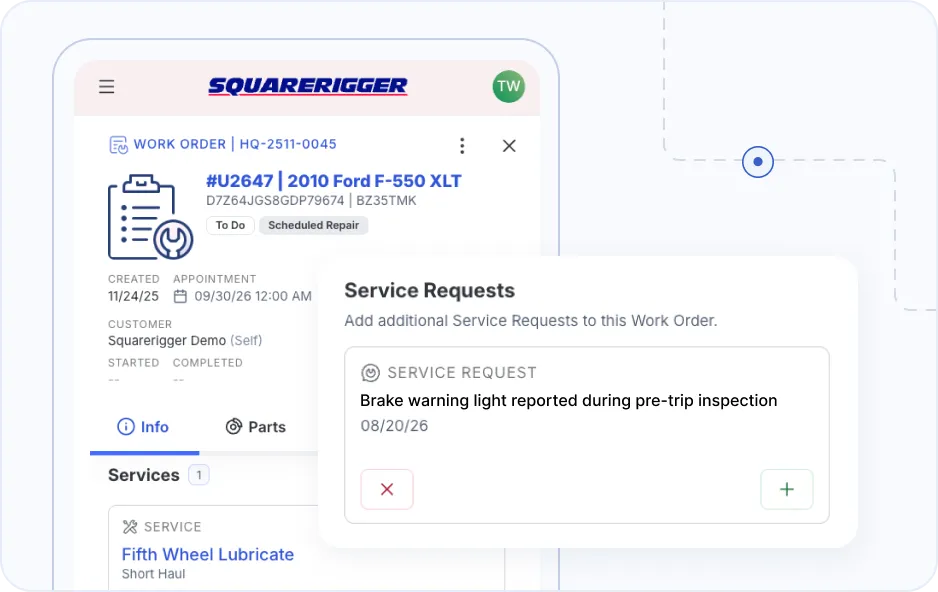
See What Else Is Due
While the Truck Is In
The screen says if the part is on the shelf.
- Upcoming services on the same unit.
- Driver complaints still waiting.
- Extra services added on the spot.
Open the Job Knowing Which Truck and Why
The report arrives with the work order.
- Unit number and VIN at the top.
- Notes and photos from the report.
- Who reported it, and when.
Time Follows the Tech From Job to Job
Labor lands on the service it belongs to.
- A timer on each service line.
- Switch services with one tap.
- Breaks and errands coded as indirect.
Add a Part Like Adding a Song to a Playlist
The screen says if the part is on the shelf.
- Search parts inside the work order.
- Phone cameras scan the barcode.
- Missing parts go to the parts manager.
See What Else Is Due While the Truck Is In
A second fix starts before the truck leaves.
- Upcoming services on the same unit.
- Driver complaints still waiting.
- Extra services added on the spot.
Accurate Bay Data Makes
the Reports Worth Reading
Analytics are only as good as the time and parts that reach them. When techs log work
as they do it, managers read numbers they can trust.

Labor as It Runs
- Team clocks by tech and work order
- Any open job's parts and notes
- Fixes for a clock left running

Parts as They Move
- Parts requests in one pending list
- Requests bundled by vendor
- Parts posted to the work order line

The Shop at a Glance
- Technician efficiency across the team
- Indirect time by code
- Dashboards set per role
Instant Reports
From Your Techs' Work
Riggs is the assistant built into Squarerigger. A manager types a question the way they would say it, and a report comes back in seconds.
Ask for the brake jobs on the 2019 and older trucks, with cost and labor time, and Riggs pulls them from the work orders your techs closed. The clocks and parts they log in the bay are what make that answer right.

Phone, Tablet, or Desktop,
Wherever the Work Is
Chris opens a work order on the shop tablet and closes it from a phone in the yard. Nothing about the job changes when the device does.
Runs in the browser or
as an app on the tablet
Adjusts itself to phone,
tablet, or desktop.
Same features on each
device, for each role.
Permissions shape what
each role sees.
Mechanics entering their own information saves us an entire person
just pounding a keyboard all day.
Equipment Superintendent and Fleet Services Manager, El Dorado County DOT
Where the Work Goes Next
Work logged at the bay feeds the inspection, request, parts,
and labor records the rest of the shop runs on.
Watch a Tech Press Play and
a Manager See It
In the demo, a technician starts a service on a phone, adds a part that is out of stock, and closes the job.
You see the team clock, the parts request, and the work order update as each step happens.
FAQ
Is Squarerigger mobile fleet maintenance software a download?
It doesn't have to be. Squarerigger runs in the browser at Squarerigger.app, so any phone or tablet can open it. On a tablet, you can also download it so it opens like an installed app. The screen rearranges itself for a phone, a tablet, or a desktop, and the features stay the same on each one. Managers, parts staff, and technicians all use the same system, so nobody is sent to a different tool for their part of the job.
Will our technicians use it on the job?
Ease for technicians is one of the main reasons shops choose Squarerigger. Starting the clock on a service is one tap, and moving to the next service is one more. Parts go onto the work order with a search or a camera scan. One recent customer had technicians working in it in under 30 minutes on their first day.
What does a technician see when they open a work order?
The truck first, with its unit number, VIN, and status. Below that, the services on the job, each with its own timer, the technicians assigned to it, and a progress count as services are checked off. The notes and photos from whoever reported the problem come along, with their name and the time they reported it. A separate view lists other work waiting on the same unit, such as a service coming due or a driver complaint, so it can be handled while the truck is already in the bay.
Can a technician add work they find in the middle of a repair?
Yes. If a tech changing a headlight finds a suspension or electrical problem, they add the service to the work order on the spot. They can also open a new work order themselves when the job calls for it.
Can more than one technician work the same service?
Yes. Each service shows the technicians assigned to it, and more can be added from the work order. Time is tracked per service, so labor stays on the job it belongs to.
How do parts work from a phone or tablet?
The tech searches for the part inside the work order and sees how many are on the shelf. If it is in stock, it goes onto the work order and the tech picks it up from the storeroom. If it is not, Squarerigger flags it and suggests in-stock alternatives, and a parts request is created at the same moment. The parts manager sees that request in a pending list, bundles it with others, and chooses the vendor.
What if a tech buys a part on the road?
With the right permissions, a tech records the outside purchase from the work order. Squarerigger creates the purchase order and receives the parts against it, so the part and its cost land on the job.
Do we need special hardware or barcode scanners?
No. Any phone or tablet with a web browser works, and barcodes scan with the device's camera. If the shop already owns laser-based readers, those work too.
Can managers see what techs are working on right now?
Yes. Team clocks show which work order each technician is on and how much time is on it, as it happens. A manager can open that work order to see its parts and notes without walking out to the bay.
What happens when a tech forgets to stop the clock?
It's common, and it's easy to fix. A manager can spot a clock still running in team clocks, open the work order, and correct the time entry so labor stays accurate.
How do you track time that isn't spent on a repair?
Indirect time codes cover the rest of the day, such as meal breaks, cleanup, errands, and parts pickups. The shop defines its own codes. Managers then see technician efficiency across the whole team, including how much time goes to work away from the truck.
Can drivers report problems from their phones?
Yes. Drivers and operators can put in a work request themselves, or complete an inspection from any device. A failed inspection item flows into the service request queue on its own, with photos of the problem and a record of who reported it and when.
Can we limit what each technician sees on mobile?
Yes. Permissions set what each role sees, down to whether a tech sees only the work orders assigned to them or equipment from other locations. Each role can also get its own dashboard, so a technician opens to a technician view and a parts manager opens to theirs.
Can managers ask questions about the work techs log?
Yes, through Riggs, the assistant built into Squarerigger. A manager types a question in plain English, such as the brake work on the older trucks with cost and labor time, and the answer comes back from the work orders the techs closed.
How fast can we get the shop running on it?
A new user can write a work order and have a technician clock time against it within the first hour. Full rollouts typically take two to six weeks, depending on how complex the operation is.
Where does our data live?
Squarerigger runs in the cloud, so there are no servers to buy or maintain in the shop. Backups run on top-tier cloud service providers.